Contact Agent (ConnectWise)
Last updated: May 28, 2026
Updated Feb 8, 2026 by Andrew Feng (Product Manager)
Overview
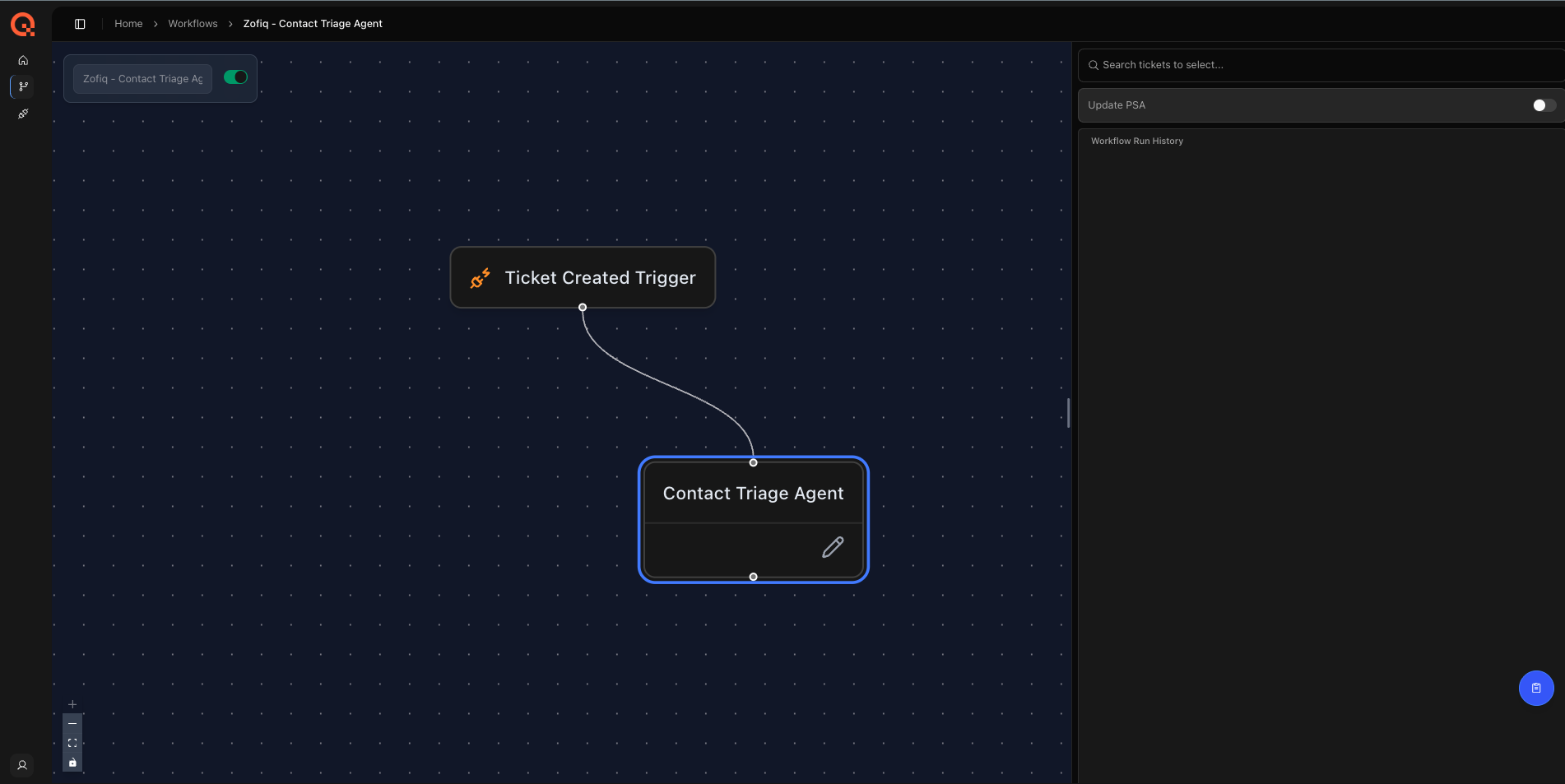
The Contact Agent ensures that tickets in ConnectWise are associated with the correct contact.
Its primary purpose is to automatically set or correct the Contact field when it is missing, incomplete, or incorrectly assigned at ticket creation. By ensuring the correct requester or end user is linked to the ticket, the agent improves communication accuracy, agreement application, and downstream automation.
The Contact Agent plays a critical role in establishing requester context. Many downstream workflows, including agreement selection, SLA evaluation, and dispatch logic, rely on an accurate contact. Because of this, the agent is designed to run early in the workflow, after company context is finalized and before agreement or ownership decisions are applied.
Important Execution Behavior
The Contact Agent runs once per ticket.
After the agent evaluates a ticket and completes its assignment, it will not run again on that ticket, even if:
The ticket changes status later
The ticket is moved back to the same board
The Contact field is manually edited after the agent runs
If the contact needs to be corrected after the agent has run, the update must be made manually.
When This Agent Runs
The Contact Agent evaluates a ticket when all of the following conditions are met:
The ticket enters a configured board
The ticket reaches a configured status
The ticket’s current Company value matches one of the configured trigger conditions
Any applicable Standard Operating Procedures (SOPs) allow the evaluation to proceed
All conditions must be satisfied for the agent to activate.
This ensures the agent runs at a deliberate point in the workflow and only evaluates tickets where contact information is missing, ambiguous, or known to be unreliable.
What This Agent Can Change
The Contact Agent can update the following field:
Contact
The agent will only modify the Contact field and does not update any other ticket fields.
The Contact Agent relies on the company assigned to the ticket. Contacts are always evaluated and selected within the context of the current company value.
If the company changes after the Contact Agent runs, the contact may be reset by ConnectWise. For this reason, the Contact Agent is intentionally orchestrated to run after the Company Agent.
Example
You may configure the agent with the following conditions:
Board equals Catchall
Status equals New
Contact is unset or matches a generic requester
In this configuration, the Contact Agent runs when a ticket reaches the New status on the Catchall board and the existing contact meets the configured trigger criteria, unless an SOP rule restricts reassignment.
This allows you to safely automate contact assignment while preserving explicit operational rules and exceptions.
Configuration Options
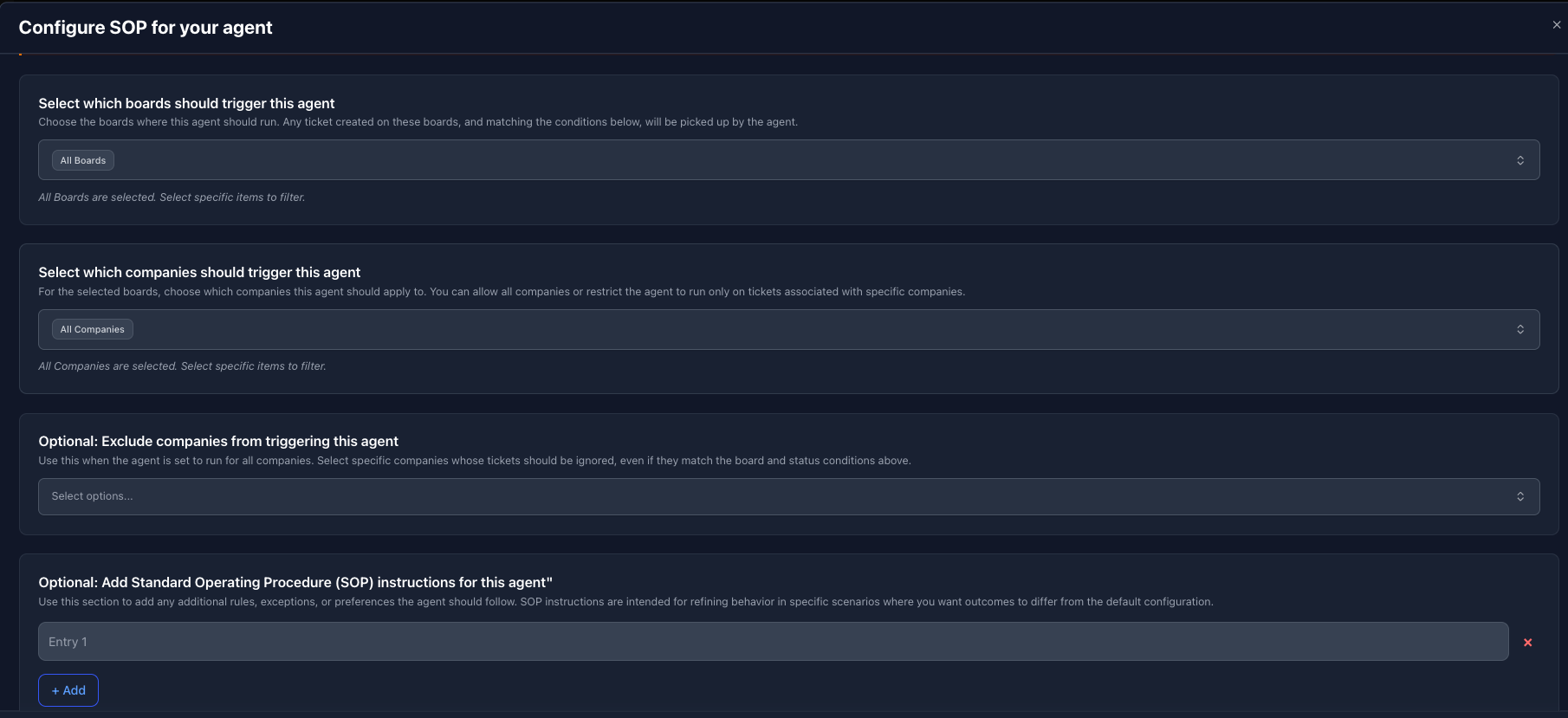

Contact Configurations
The Contact Agent uses a combination of board scope, severity trigger conditions, exclusions, and optional SOP instructions to determine when a ticket should be evaluated and whether classification updates are allowed.
1. Select Which Boards Should Trigger This Agent
This setting defines where the agent is allowed to run.
Select one or more boards where the Agent should evaluate tickets. Only tickets that exist on these boards will be considered.
If all boards are selected, the agent may run on tickets from any board, provided all other trigger conditions are met. The agent is set to run on all boards by default.
This setting does not determine what the agent changes. It only controls eligibility based on board placement.
2. Select Which Companies Should Trigger This Agent
This setting defines which existing company values are eligible for urgency, impact, and priority evaluation.
By default, if no companies are selected, the Agent will evaluate tickets from all companies, provided all other trigger conditions are met.
When companies are selected, the agent will only evaluate tickets whose initial Company field matches one of the selected values.
This is commonly used when:
Tickets are created under placeholder companies such as Catchall or Unknown
Certain company records are known to produce unreliable urgency or priority values at ticket creation
Automated severity classification should apply only to specific customers or service tiers
If all companies are selected, the behavior is equivalent to leaving the setting empty.
Important Clarification
This setting is evaluated against the company value present on the ticket when it first enters your ConnectWise environment.
In practice, the agent reads the ticket’s initial Company field at creation time and uses that value to determine eligibility. Any company changes made later in the ticket lifecycle do not affect whether this agent runs.
This ensures severity classification remains predictable and does not change retroactively as company assignments are updated.
3. Optional: Exclude Companies From Triggering This Agent
This setting defines hard exclusions.
Tickets whose current Company value matches any excluded company will never be evaluated, even if:
The board condition is met
The status condition is met
The company is otherwise included in the trigger list
Common use cases include:
Your internal MSP company
Vendor or distributor records
Administrative or system level companies
Exclusions take precedence over company trigger selections.
4. Optional: Add Standard Operating Procedure (SOP) Instructions
SOPs provide behavioral rules and guardrails that the agent must follow.
SOPs are evaluated after trigger conditions are met but before any prediction or change is applied.
SOPs can be used to:
Restrict when the agent is allowed to change the company
Prevent reassignment in specific scenarios
Force or exclude specific company outcomes
Add business context that cannot be captured by filters alone
SOPs are optional. If no SOP is provided, the agent relies on board scope, company triggers, exclusions, historical patterns, and ticket context.
If an SOP applies and blocks execution, the agent will not modify the ticket. The decision and reason are recorded in the workflow logs.
How SOPs Affect Execution
SOPs are evaluated before the agent applies any inferred prediction.
If an SOP applies, it may:
Explicitly allow the agent to proceed
Restrict the agent from making any change
Force a specific company assignment
Exclude certain companies from reassignment
If an SOP blocks execution, the agent will not modify the ticket, even if all other trigger conditions are met. The outcome is recorded in the workflow logs.
Contact Specialty Configurations
1. Add Triaged by AI Internal Note
When this option is enabled, the Contact Agent will automatically add an Internal Note to the ticket whenever it updates the contact.
The note added to the ticket will read:
Attention: This ticket was triaged by zofiQ AI Agent.
This is useful if you want technicians and managers to clearly see when an AI agent has made a change, especially during early rollout or validation. It helps improve transparency and makes it easier to audit automated actions directly from the ticket.
If this option is disabled, the agent will still update the contact, but no internal note will be added.
2. Contact Creation Mode
This setting controls how the Contact Agent behaves when a ticket is submitted by someone who does not already exist as a contact in ConnectWise.
You can choose how much automation you want based on how new end users are typically introduced into your environment.
Disabled
The agent will not create new contacts.
If the submitter does not already exist in ConnectWise, the ticket will remain unchanged and no contact will be assigned. This option is best for MSPs that require contacts to be created manually or through a separate onboarding process.
Allow Company Domains Only
The agent will create a new contact only if the submitter’s email domain matches the associated company’s domain.
This option provides a balance between automation and control. It helps prevent unintended contact creation while still allowing common end-user scenarios to be handled automatically.
Allow All Domains
The agent will create a new contact for any submitter, regardless of email domain.
This option is best suited for environments where tickets may come from external users, shared inboxes, or non-standard domains, and where rapid contact creation is preferred over manual review.
How Predictions Are Made
The Contact Agent determines the correct urgency impact and priority by evaluating multiple signals together, not by relying on any single field or rule in isolation.
Each decision is based on a combination of historical patterns, real-time ticket context, and explicit operational rules. When conflicts exist, SOP rules take precedence over inferred signals.
1. Historical ContactAssignments
The agent learns from how your team has historically classified contact in ConnectWise.
Past severity decisions for similar tickets help establish patterns that reflect how your organization typically assesses criticality. This allows classifications to align with real-world operational behavior rather than generic or default assumptions.
Historical patterns inform severity decisions, but they are evaluated alongside ticket context and SOP rules rather than acting in isolation.
2. Ticket Context
At runtime, the agent evaluates the full ticket context, including:
Summary
Description
Notes
Requester and sender details
Rather than relying on a single keyword or field, the agent considers how all available information relates to urgency, scope of impact, and required response time. This allows it to assess severity even when individual fields are incomplete, inconsistent, or ambiguous.
No single field is treated as authoritative on its own.
3. Standard Operating Procedures (SOP) Rules
SOPs act as high-priority guidance for the Agent.
When an SOP applies, it is evaluated before inferred signals from historical data and ticket context and is treated as the strongest input in the decision process. In the vast majority of cases, SOP instructions are followed explicitly and drive the final company assignment.
SOPs can be used to allow, restrict, or strongly bias company assignments based on your defined operational rules. Both positive and negative SOPs consistently outweigh inferred predictions and are designed to enforce your operational intent.
While the Agent evaluates SOPs alongside full ticket context, cases where an applicable SOP is not followed are rare and typically tied to ambiguous or conflicting ticket signals. All such decisions are visible in workflow logs for review.
Interaction With Other zofiQ Agents
The Contact Agent is part of zofiQ’s coordinated triage workflow and relies on accurate company information.
When multiple triage agents are enabled, zofiQ follows a defined orchestration order to ensure consistent outcomes. The Contact Agent runs after the Company Agent so that contacts are evaluated within the correct customer context.
At a high level, the orchestration flow is:
Company Agent
Identifies and confirms the correct company as early as possible to establish core ticket context.
Urgency, Impact, and Priority Agent
Evaluates urgency, impact, and priority early using the initial ticket content and company context.Board Agent
Determines the correct board for the ticket based on classification rules and routing logic.Contact Agent
Assigns or corrects the contact once company and agreement context is finalized.
Agreement Agent
Assigns the appropriate agreement using stabilized company and priority context.Dispatch Agent
Assigns ticket ownership after all classification and contractual decisions are complete.Summary Line Agent
Generates or refines the ticket summary last, incorporating all prior decisions and final context.
This ordering prevents contact mismatches and ensures communication flows to the correct end user.
Visibility and Control
All Contact Agent decisions follow the configured filters, overwrite rules, and SOP constraints.
Every action taken by the agent is fully observable:
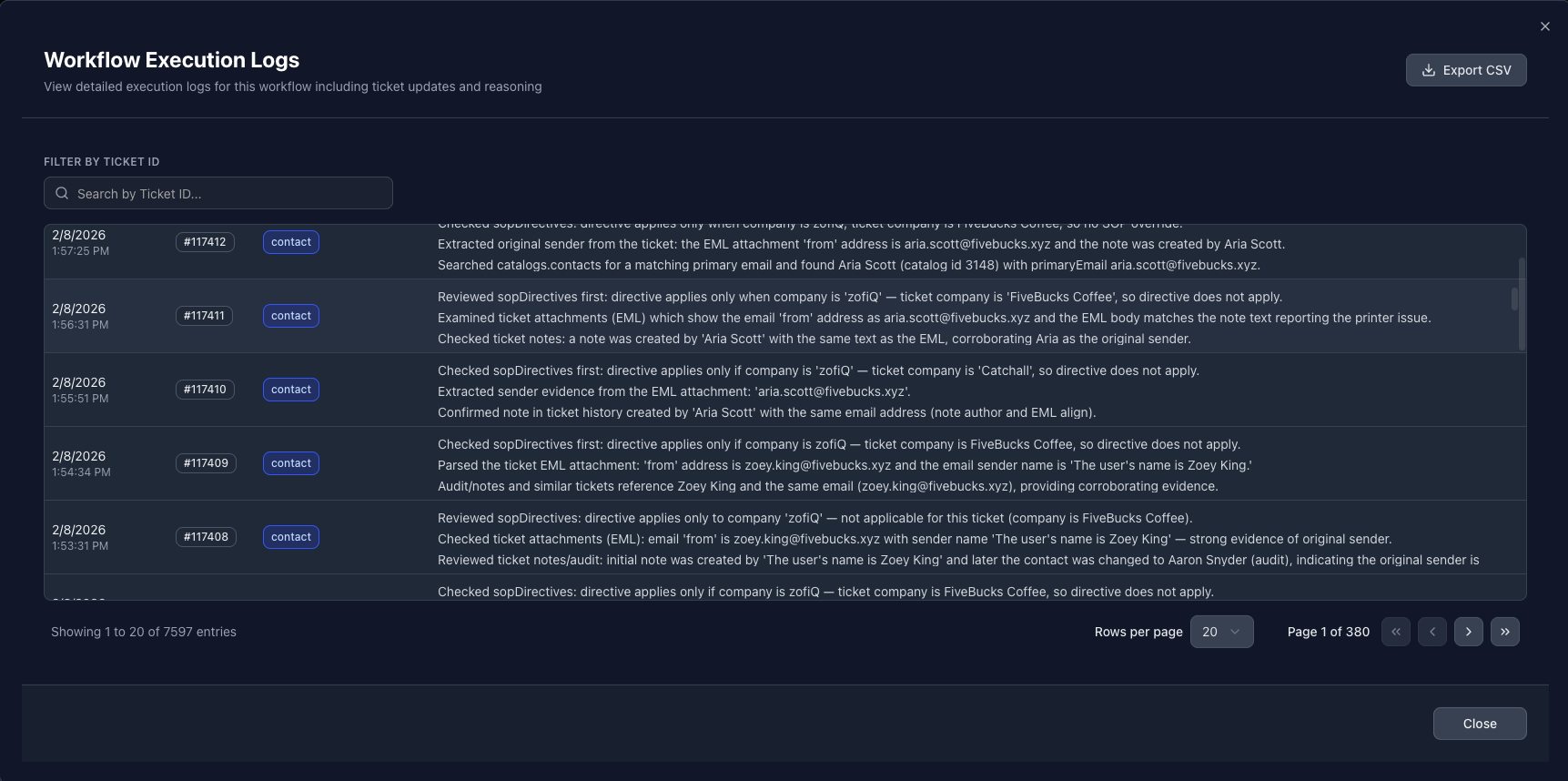
All evaluation steps, decisions, and execution outcomes are recorded in the agent’s individual Workflow Logs
Any changes applied by the agent are also reflected in the audit trail of each ticket it affects within the PSA
This provides a clear, end to end view of what the agent evaluated, what decision it made, and why, ensuring agreement assignment remains predictable, auditable, and aligned with how your organization delivers and bills for services.
If you have any other questions or concerns you can reach out to support@zofiq.ai